Patient Summary
The Patient Summary card gives a structured, at-a-glance overview of a patient and lets you jump from any finding to the note it came from. It appears in the embedded patient view when the patient has summary data.
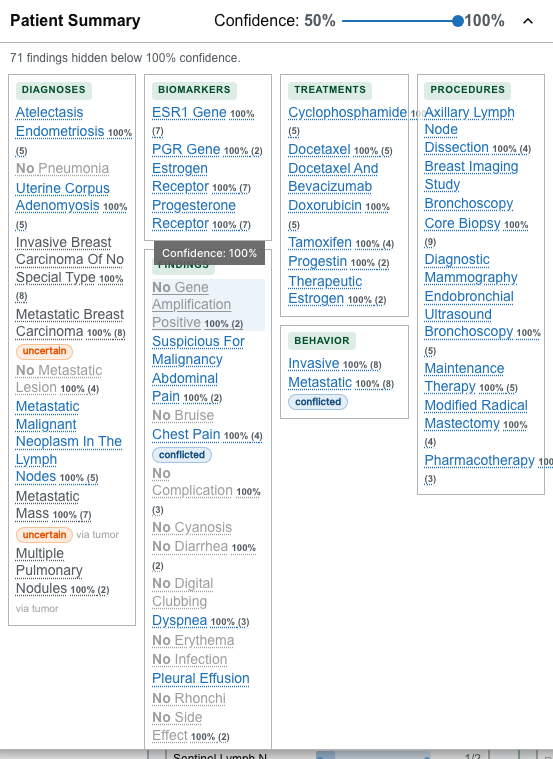
What it groups
The card organizes findings into sections, shown when data is present:
- diagnoses;
- staging;
- grading;
- biomarkers;
- treatments;
- procedures;
- findings; and
- behavior.
Use the collapse/expand control in the card header to fold the card to a slim strip and back.
Reading the indicators
Items are styled to convey clinical meaning:
- Negated items (findings recorded as absent) are struck through and dimmed, and read as "No …".
- Historic items appear muted.
- Uncertain and Conflicted items carry a small labeled chip.
- A source label notes where a value came from.
Filter by confidence
Each finding carries an extraction confidence — how sure the natural-language processing was about it. A Confidence slider in the card header hides findings below a chosen threshold so you can focus on the most certain results.
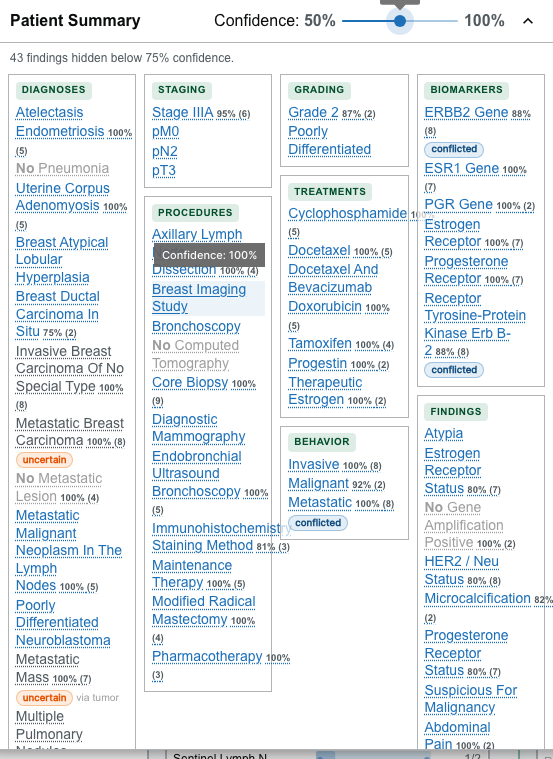
- Drag the slider between 50% and 100% (in 5% steps) to set the minimum confidence.
- Findings below the threshold are hidden, and a live message reports how many — for example, "3 findings hidden below 85% confidence."
- Findings with no confidence score are always kept, so nothing is silently dropped for lack of a score.
- If nothing meets the threshold, the card says so and prompts you to lower it.
The threshold starts at its maximum (100%), so until you lower the slider the card shows only findings extracted with full confidence — plus any finding that has no confidence score. Lower the slider to reveal more.
Follow an item to its source note
An item that resolves to one or more source notes is shown as an interactive link:
- A single-source item opens its source note directly in the Document Viewer.
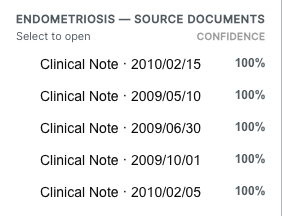
- A multi-source item shows a count (for example, "(4)") and, when clicked, opens a document picker listing its sources.
In the picker:
- sources are ranked by confidence, highest first;
- the highest-confidence source is labeled;
- the note that is currently open is marked; and
- choosing a note opens it in the Document Viewer.
Selecting the same single-source item again clears the selection and closes its note.
Not every summary item has a resolvable source note. Items that cannot be tied to a note are shown as plain text rather than links.